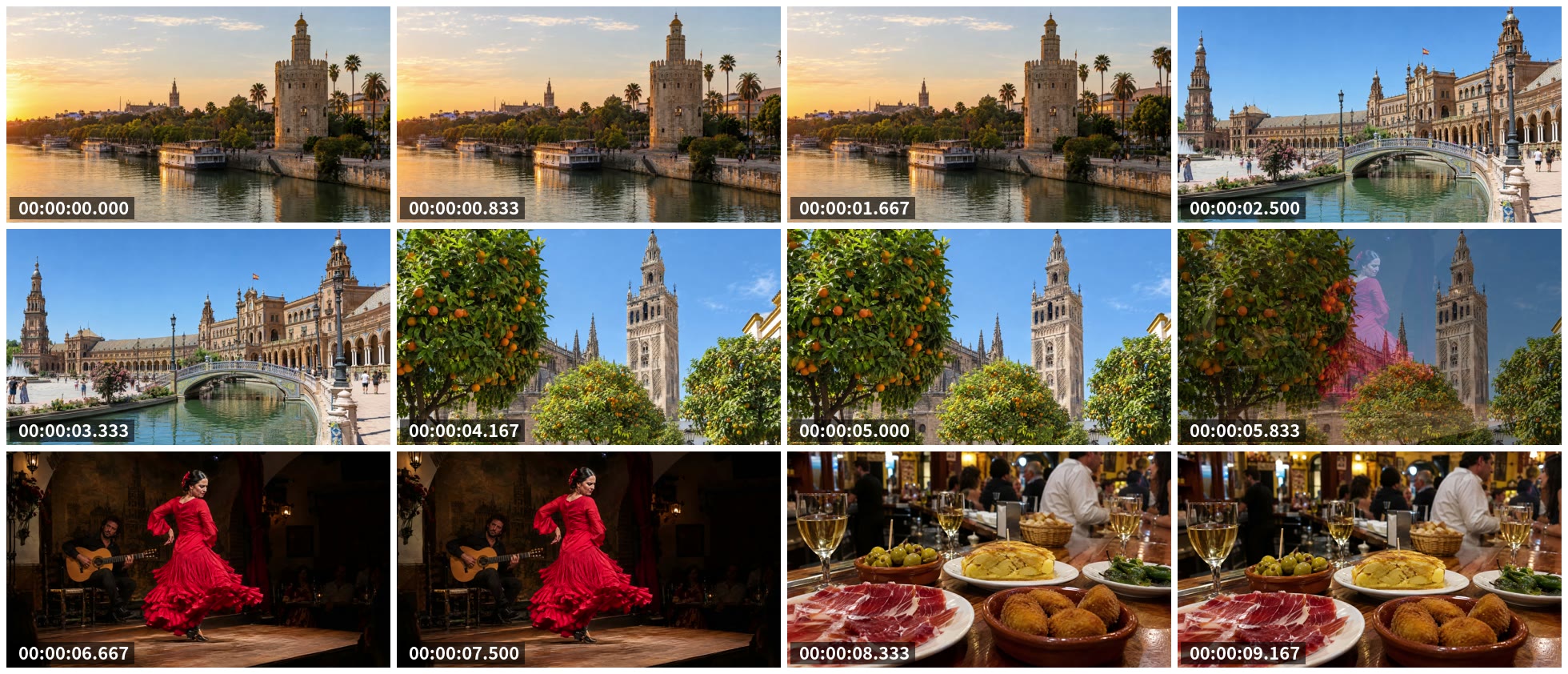
Keep every 25th frame with select, shrink each to 480 px and let tile=4x3 lay out 12 timestamped tiles in one JPEG. One ReelSDK API call makes the sheet from a 10-second clip for under half a cent, at $0.02 per compute minute.
Make a contact sheet from a video with ffmpeg
The trick is a frame count that fills the grid: 293 frames taken 1 in 25 leave exactly 12, a full 4x3 sheet. On ReelSDK, drawtext uses the engine's default font, or any font file you send as an input.

GuidesUpdated
ffmpeg -i in.mp4 -vf "select='not(mod(n,25))',scale=480:-2,drawtext=text='%{pts\:hms}':x=10:y=h-th-10:fontsize=22:fontcolor=white:box=1:boxcolor=black@0.6:boxborderw=6,tile=4x3:padding=8:margin=8:color=white" \
  -frames:v 1 -update 1 -q:v 3 sheet.jpg
select keeps frame 0, 25, 50 and on; drawtext writes each frame's time at the bottom left; tile lays them out 4 across and 3 down with 8 px of white between. -update 1 writes a single image.
Variations
The other commands you will need
Plain grid
No spacing and no text: 4 tiles of 480 px make exactly 1920 wide, 3 rows of 270 make 810 high.
plain ffmpeg -i in.mp4 -vf "select='not(mod(n,25))',scale=480:-2,tile=4x3" -frames:v 1 -update 1 -q:v 3 sheet.jpgSpread evenly by time
When you know the length,
fpsset to 12 frames divided by the length in seconds picks them evenly, whatever the frame rate.even ffmpeg -i in.mp4 -vf fps=12/9.767,scale=480:-2,tile=4x3 -frames:v 1 -update 1 -q:v 3 sheet-fps.jpgThe most typical frame of each batch
thumbnail=24keeps one frame from each 24, skipping flashes and fades. It is a little slower, because it compares every frame.thumbnail ffmpeg -i in.mp4 -vf thumbnail=24,scale=480:-2,tile=4x3:padding=8:margin=8:color=white -frames:v 1 -update 1 -q:v 3 sheet-thumb.jpg
The flags
The options in these commands
| Flag | What it does | Used here |
|---|---|---|
tile=4x3 | Lays frames out in 4 columns and 3 rows; the default is 6x5 | All four |
select | With not(mod(n,25)), keeps every 25th frame | Timestamps, plain |
drawtext | Writes text; %{pts\:hms} is the frame's time | Timestamps |
padding=8 | Pixels between tiles | Timestamps, thumbnail |
margin=8 | Pixels around the outside | Timestamps, thumbnail |
fps=12/9.767 | 12 frames spread evenly over the length in seconds | Even |
thumbnail=24 | Keeps the most typical frame of each 24 | Thumbnail |
-update 1 | Writes one image file, not a numbered sequence | All four |
Sources: ffmpeg filters: tile, ffmpeg filters: drawtext, checked November 2026.
Sizing the grid
Match the frame count to the grid. Every 25th of our 293 frames is frames 0 to 275, 12 in all, which fills 4x3 exactly. For another clip, divide its frame count by the number of tiles to get the step.
Width is tiles times tile width: 4 times 480 is 1920. padding puts 8 px between tiles and margin 8 px around the edge: 3 gaps and 2 margins across, 2 and 2 down, which is how 1920x810 grew to 1960x842.
Fonts on the API
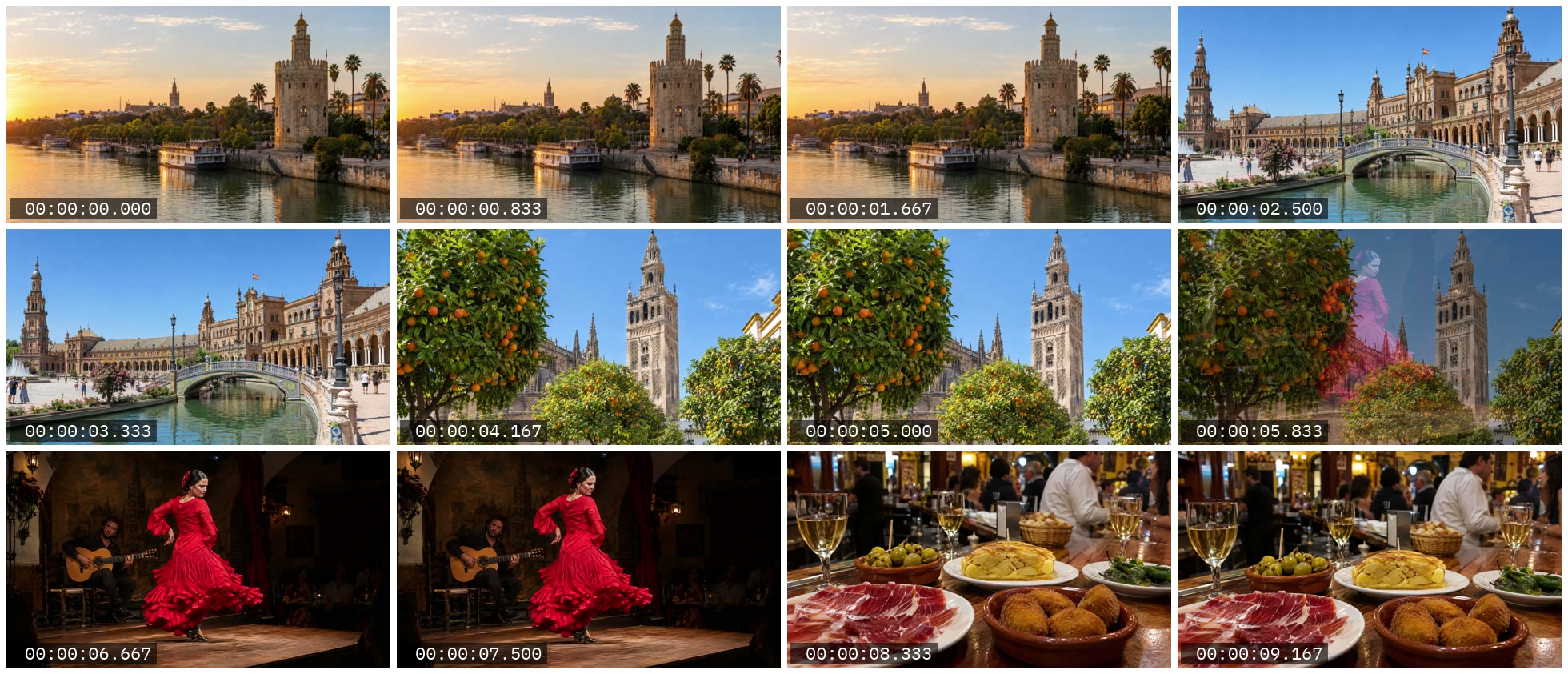
Without fontfile, drawtext on the API used the engine's default font, as the sheet above shows. A path like fontfile=/usr/share/fonts/DejaVuSans.ttf gets a 400 before the job starts: "must not use absolute paths, files live in the job directory".
To pick a font, point fontfile at one of the bundled fonts in /usr/share/fonts/reelsdk/, or send your own as an input and name it: fontfile=font.ttf. We did this with IBM Plex Mono, under the SIL Open Font License; it finished in about 4 seconds. Billing is per compute second; see pricing.

curl "https://api.reelsdk.com/v1/ffmpeg?wait=60" \
  -H "Authorization: Bearer $REELSDK_KEY" \
  --json '{
    "inputs": {
      "in.mp4": "https://api.reelsdk.com/f/lib/demo/landscape.mp4",
      "font.ttf": "https://raw.githubusercontent.com/google/fonts/main/ofl/ibmplexmono/IBMPlexMono-Regular.ttf"
    },
    "args": [
      "-i", "in.mp4", "-vf",
      "select='\''not(mod(n,25))'\'',scale=480:-2,drawtext=fontfile=font.ttf:text='\''%{pts\\:hms}'\'':x=10:y=h-th-10:fontsize=22:fontcolor=white:box=1:boxcolor=black@0.6:boxborderw=6,tile=4x3:padding=8:margin=8:color=white",
      "-frames:v", "1", "-update", "1", "-q:v", "3", "sheet-font.jpg"
    ],
    "outputs": ["sheet-font.jpg"]
  }'
Without installing ffmpeg
The same command as one API call
Send the first command's args to POST /v1/ffmpeg. Each job runs ffmpeg 8.1 on a fresh machine at $0.02 per compute minute, billed per second; this one finished in about 15 seconds and cost under half a cent. drawtext used the engine's default font.
curl "https://api.reelsdk.com/v1/ffmpeg?wait=60" \
  -H "Authorization: Bearer $REELSDK_KEY" \
  --json '{
    "inputs": {
      "in.mp4": "https://api.reelsdk.com/f/lib/demo/landscape.mp4"
    },
    "args": [
      "-i", "in.mp4", "-vf",
      "select='\''not(mod(n,25))'\'',scale=480:-2,drawtext=text='\''%{pts\\:hms}'\'':x=10:y=h-th-10:fontsize=22:fontcolor=white:box=1:boxcolor=black@0.6:boxborderw=6,tile=4x3:padding=8:margin=8:color=white",
      "-frames:v", "1", "-update", "1", "-q:v", "3", "sheet.jpg"
    ],
    "outputs": ["sheet.jpg"]
  }'
FAQ
Questions, answered
How do I make a contact sheet of a video with ffmpeg?
Pick frames with select, scale them, then tile=4x3 and write one image with -frames:v 1 -update 1. Ours took under 2 seconds for 12 tiles.
How do I add timestamps to each tile?
Put drawtext=text='%{pts\:hms}' between scale and tile, so each frame gets its own time before it is tiled.
How do I choose how many frames to skip?
Divide the frame count by the number of tiles. 293 frames over 12 tiles is a step of about 24, and 25 fills a 4x3 grid exactly.
Can I use my own font on the API?
Yes. Send the font file as an input, for example font.ttf, and set fontfile=font.ttf. Absolute paths are refused, except the bundled fonts in /usr/share/fonts/reelsdk/.
- Video thumbnails with ffmpegGrab a frame at a time, let the thumbnail filter pick a good one, or pull keyframes and scene changes as JPEGs.
- Extract frames from a video with ffmpegSave frames as images: one per second, every Nth frame, at exact times or all of them, and the API's 20-frame limit.
- Add text to a video with ffmpeg drawtextDraw a title or a running clock on video with drawtext: font, size, a box behind it, position, timing and the colon you have to escape.
- Video to GIF with ffmpegMake a clean GIF from a video with palettegen and paletteuse, then shrink it with frame rate, size, colours or a different format.
- ffmpeg -filter_complex explainedLabels, commas and semicolons: how a filtergraph wires inputs to outputs, with four working graphs and the errors they fix.
- Video thumbnailsGrab a poster frame and a contact sheet with one frame per shot from one ffmpeg call, under a fifth of a cent for both.
- FFmpeg onlineRun your own ffmpeg command on your files in the browser, free and without installing or uploading anything.
- ffmpeg exited with code 1: Conversion failed!fluent-ffmpeg reports only ffmpeg's exit code and last line. The real cause is in stderr: print it, or use -v error to see it alone.
- ReelSDK vs self-hosted FFmpegTranscoding a minute of 1080p to 720p takes about 24 seconds of compute: about 0.8 cents on ReelSDK, about a tenth of a cent on a busy 4 vCPU box. Below about 11,000 minutes a month, the API costs less than an always-on box.
Sources, checked November 2026
Ready to build?
Ship video from your app today
Your first $0.50 is free, and one key covers every endpoint.
