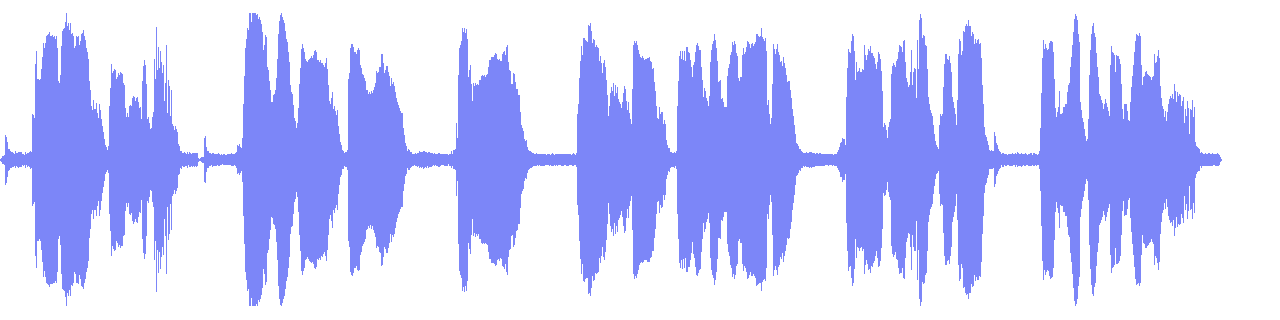
showwavespic paints a whole track as one 1280x320 PNG; showwaves animates it, and needs draw=full or the color comes out wrong. ReelSDK made both from an 11-second clip in one job, under a quarter of a cent at $0.02 per compute minute.
Make an audio waveform with ffmpeg
For a 1080x1080 audiogram at 30 fps, mix the audio to mono and draw it on a square-root scale. ReelSDK's free waveform video tool does it with no command at all, in 9:16 and 16:9 too.

GuidesUpdated
ffmpeg -i in.mp4 -filter_complex \
  "aformat=channel_layouts=mono,showwavespic=s=1280x320:colors=#7C86F8:scale=sqrt:filter=peak" \
  -frames:v 1 wave.png
Mixes the channels to mono, draws the peaks on a square-root scale and writes one transparent 1280x320 PNG of a few KB.
Variations
The other commands you will need
An audiogram video
A 1080x400 waveform over a 1080x1080 color background, with the original audio.
shortest=1stops the endless background when the audio ends.audiogram ffmpeg -i in.mp4 -filter_complex \ "[0:a]aformat=channel_layouts=mono,showwaves=s=1080x400:mode=cline:rate=30:colors=#7C86F8:draw=full:scale=sqrt[w];\ color=c=#101C33:s=1080x1080:r=30[bg];\ [bg][w]overlay=0:340:shortest=1,format=yuv420p[v]" \ -map "[v]" -map 0:a -c:v libx264 -crf 20 -c:a aac -b:a 160k audiogram.mp4
The flags
The options in these commands
| Flag | What it does | Used here |
|---|---|---|
aformat=channel_layouts=mono | Mixes the channels down so one waveform is drawn | Both |
s=1280x320 | Size of the picture or video in pixels | Both |
colors=#7C86F8 | Color of the wave | Both |
scale=sqrt | Amplitude scale; square root makes quiet parts easier to see than linear | Both |
filter=peak | Draws peak values per column instead of the average | Picture |
mode=cline | A centered vertical line per sample instead of the default dots | Video |
draw=full | Draws every sample at full color; the default scale fades it | Video |
rate=30 | Frames per second of the waveform video | Video |
overlay=0:340:shortest=1 | Places the wave 340 px from the top and ends with the audio | Video |
Sources: ffmpeg filters: showwaves, ffmpeg filters: showwavespic, checked November 2026.
Why the color comes out wrong
Ask showwaves for #7C86F8 and you may get something greener and paler. Its draw option defaults to scale, which scales the pixel values of each drawn sample. In our frame, nine in ten drawn pixels came out a pale olive at about a third opacity, and not one was the color we asked for.
With draw=full every drawn pixel was exactly #7C86F8, fully opaque. If brand color matters, set it.
Mono first, then draw
A stereo track has two waveforms, and by default they are drawn in the same area on top of each other. aformat=channel_layouts=mono mixes them into one before drawing, which gives a single clean shape. If you want both, keep stereo and add split_channels=1 to stack them.
scale=sqrt matters for speech. On a linear scale the quiet ends of words are a thin line; the square root lifts them so the picture shows the rhythm of the voice.
Picture or video
showwavespic reads the whole track and writes one image, so -frames:v 1 and a .png name are all it needs. It is the right tool for a thumbnail, a podcast page or a preview strip.
showwaves makes video. On its own it is just the wave; to get a usable audiogram, generate a background with the color source, overlay the wave on it and map the audio back in. The color source never ends, so shortest=1 on the overlay is what stops the video when the audio ends.
Without installing ffmpeg
The same command as one API call
One POST /v1/ffmpeg job can write both files: asplit feeds the same audio to both filters and each output gets its own -map. Each job runs ffmpeg 8.1 on a fresh machine at $0.02 per compute minute, billed per second; this one finished in a few seconds and cost under a quarter of a cent.
curl "https://api.reelsdk.com/v1/ffmpeg?wait=60" \
  -H "Authorization: Bearer $REELSDK_KEY" \
  --json '{
    "inputs": {
      "in.mp4": "https://api.reelsdk.com/f/lib/demo/clip.mp4"
    },
    "args": [
      "-i", "in.mp4", "-filter_complex",
      "[0:a]aformat=channel_layouts=mono,asplit=2[a1][a2];color=c=#101C33:s=1080x1080:r=30[bg];[a1]showwaves=s=1080x400:mode=cline:rate=30:colors=#7C86F8:draw=full:scale=sqrt[w];[bg][w]overlay=0:340:shortest=1,format=yuv420p[v];[a2]showwavespic=s=1280x320:colors=#7C86F8:scale=sqrt:filter=peak[p]",
      "-map", "[v]", "-map", "0:a", "-c:v", "libx264", "-crf", "20", "-c:a",
      "aac", "-b:a", "160k", "audiogram.mp4", "-map", "[p]", "-frames:v",
      "1", "wave.png"
    ],
    "outputs": ["audiogram.mp4", "wave.png"]
  }'
FAQ
Questions, answered
How do I make a waveform image with ffmpeg?
Run ffmpeg -i in.mp4 -filter_complex "aformat=channel_layouts=mono,showwavespic=s=1280x320:colors=#7C86F8" -frames:v 1 wave.png. The PNG has a transparent background.
Why is my showwaves color different from what I set?
The draw option defaults to scale, which fades each sample. Add draw=full to get the exact color; in our test it turned every drawn pixel from a faded olive into #7C86F8.
How do I make an audiogram video with ffmpeg?
Overlay showwaves on a color background and map the original audio: color=c=#101C33:s=1080x1080 as the background, overlay with shortest=1 so it ends with the audio, then encode with libx264.
Can an API make waveform videos?
Yes. POST the same args to https://api.reelsdk.com/v1/ffmpeg; one job can return the video and the PNG together. It runs ffmpeg 8.1 for $0.02 per compute minute, billed per second.
- Audio to waveform videoTurn a song or podcast clip into an MP4 with a moving waveform: free here, or one POST /v1/ffmpeg call with the same filter graph.
- Audiogram APITurn a podcast clip and cover art into a vertical waveform video with burned-in captions, using two API calls.
- Make a spectrogram with ffmpegRender a spectrogram image with showspectrumpic or a scrolling one with showspectrum, and read what it says about your audio.
- Remove silence from audio with ffmpegTrim dead air at the start, shorten long pauses with silenceremove, or cut the matching video with select and aselect.
- Extract audio from a video with ffmpegCopy the AAC track out of an MP4 without re-encoding, or convert it to MP3 or WAV, with the file size each command produced.
- Normalize audio loudness with ffmpeg loudnormBring any track to a loudness target such as -14 LUFS with loudnorm: one pass, or a measured second pass that keeps the dynamics.
- ffmpeg -filter_complex explainedLabels, commas and semicolons: how a filtergraph wires inputs to outputs, with four working graphs and the errors they fix.
- FFmpeg onlineRun your own ffmpeg command on your files in the browser, free and without installing or uploading anything.
Sources, checked November 2026
Ready to build?
Ship video from your app today
Your first $0.50 is free, and one key covers every endpoint.
