silenceremove with stop_periods=-1 and stop_duration=0.5 cuts every long pause to half a second and keeps the breaths between words. On ReelSDK, at $0.02 per compute minute, a voice track like ours costs under a tenth of a cent.
Remove silence from audio with ffmpeg
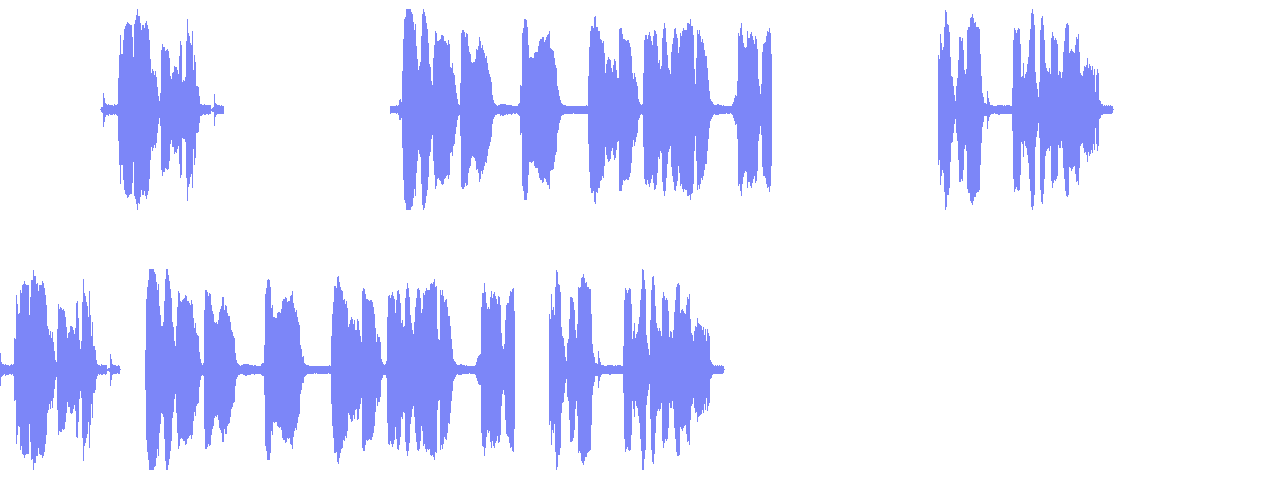
silencedetect finds the gaps and silenceremove shortens them: a 19-second voice with 2.5-second pauses drops to 11 seconds, and ReelSDK's API finished it in under 3 seconds. The pauses inside sentences stay as they were.
GuidesUpdated
ffmpeg -i talk.m4a -af silenceremove=start_periods=1:start_threshold=-50dB:\
stop_periods=-1:stop_duration=0.5:stop_threshold=-50dB \
  -c:a aac -b:a 160k tight.m4a
Removes the silence at the start and cuts every pause below -50 dB down to half a second: a 19-second track came out at 11 seconds.
Variations
The other commands you will need
Find the silences first
Prints the start, end and length of every gap below -50 dB that lasts 0.5 s or more. Our track has four.
detect ffmpeg -i talk.m4a -af silencedetect=noise=-50dB:d=0.5 -f null -Trim only the start
Drops the leading silence and leaves the rest, about 1.5 seconds shorter.
trim start ffmpeg -i talk.m4a -af silenceremove=start_periods=1:start_threshold=-50dB \ -c:a aac -b:a 160k start.m4a
The flags
The silenceremove options in these commands
| Flag | What it does | Used here |
|---|---|---|
start_periods=1 | Trims silence at the start until the first sound | Both cuts |
start_threshold=-50dB | Level below which the start counts as silence; the default is 0 | Both cuts |
stop_periods=-1 | Negative: keeps going through the whole file, so pauses in the middle are cut too | Shorten pauses |
stop_duration=0.5 | How much of each pause is copied before the rest is dropped | Shorten pauses |
stop_threshold=-50dB | Level below which a pause counts as silence | Shorten pauses |
silencedetect=noise=-50dB:d=0.5 | Logs every gap below -50 dB lasting 0.5 s or more | Detect |
Source: ffmpeg filters: silenceremove, checked November 2026.
What stop_duration really does
It reads like the minimum length of a pause to remove. It works more like the amount of pause to keep. The docs call it the silence that must exist before audio is not copied any more: ffmpeg copies the first 0.5 s of each pause, then drops the rest until the sound comes back.
You can see it in the output. With 0.5 the three long pauses came out at about half a second each. With 1 they keep about a second each and the track runs 1.5 seconds longer. Pauses shorter than the value are never touched, which is why the breaths between words, all under 0.4 s, survived.
Too tight sounds wrong
At stop_duration=0.2 the track came out about three quarters of a second shorter than cutting only the long gaps down to 0.2 s would give, so the filter also took time out of the pauses between words, and the speech ran together. Half a second kept our track natural.
Pick the threshold from your audio
Both thresholds default to 0, which only matches digital silence. Real recordings have room noise, so set a level. Run silencedetect with a few values and see where the gaps appear. On our track -50 dB found exactly the four gaps we inserted plus nothing else of 0.5 s or longer.
Cutting the video too
silenceremove only works on audio. For a talking-head video, take the speech ranges from silencedetect and keep those frames and samples with select and aselect. Both need new timestamps afterwards. On a 19-second test video this jump cut came out at about half the length.
ffmpeg -i talk.mp4 \
  -vf "select='between(t,1.546,3.218)+between(t,5.975,11.540)+between(t,14.040,16.467)',setpts=N/FRAME_RATE/TB" \
  -af "aselect='between(t,1.546,3.218)+between(t,5.975,11.540)+between(t,14.040,16.467)',asetpts=N/SR/TB" \
  -c:v libx264 -crf 20 -c:a aac cut.mp4
Without installing ffmpeg
The same command as one API call
Send the same args to POST /v1/ffmpeg with the audio URL in inputs. Each job runs ffmpeg 8.1 on a fresh machine at $0.02 per compute minute, billed per second; this one finished in under 3 seconds and cost under a tenth of a cent.
curl "https://api.reelsdk.com/v1/ffmpeg?wait=60" \
  -H "Authorization: Bearer $REELSDK_KEY" \
  --json '{
    "inputs": {
      "talk.m4a": "https://api.reelsdk.com/f/lib/in/guides/talk-pauses.m4a"
    },
    "args": [
      "-i", "talk.m4a", "-af",
      "silenceremove=start_periods=1:start_threshold=-50dB:stop_periods=-1:stop_duration=0.5:stop_threshold=-50dB",
      "-c:a", "aac", "-b:a", "160k", "tight.m4a"
    ],
    "outputs": ["tight.m4a"]
  }'
FAQ
Questions, answered
How do I remove silence from audio with ffmpeg?
Use -af silenceremove=start_periods=1:start_threshold=-50dB:stop_periods=-1:stop_duration=0.5:stop_threshold=-50dB. It trims the start and shortens every pause below -50 dB to half a second.
Why does silenceremove not remove anything?
The thresholds default to 0, which only matches digital silence. Set start_threshold and stop_threshold to a level like -50dB, and use stop_periods=-1 to work through the whole file rather than only the start.
How do I remove silence from a video, not just the audio?
Find the speech ranges with silencedetect, then keep them with select and aselect and reset timestamps with setpts=N/FRAME_RATE/TB and asetpts=N/SR/TB.
Can I run silenceremove without installing ffmpeg?
Yes. POST the same args to https://api.reelsdk.com/v1/ffmpeg with the audio URL in inputs. It costs $0.02 per compute minute, billed per second, and failed jobs are free.
- Normalize audio loudness with ffmpeg loudnormBring any track to a loudness target such as -14 LUFS with loudnorm: one pass, or a measured second pass that keeps the dynamics.
- Trim a video with ffmpegCut a clip with -ss and -to: frame-exact with a re-encode, fast with -c copy, and why the copy starts before your time.
- Make an audio waveform with ffmpegDraw a waveform PNG with showwavespic or a moving audiogram video with showwaves, in the exact color you ask for.
- Extract audio from a video with ffmpegCopy the AAC track out of an MP4 without re-encoding, or convert it to MP3 or WAV, with the file size each command produced.
- Speed up or slow down video with ffmpegChange playback speed with setpts for the picture and atempo for the sound, from timelapse to smooth slow motion.
- Video to SRT APISend a video URL and get SRT and VTT subtitle files, a word-timed transcript and a captioned copy of the video back.
- FFmpeg onlineRun your own ffmpeg command on your files in the browser, free and without installing or uploading anything.
- ReelSDK vs self-hosted FFmpegTranscoding a minute of 1080p to 720p takes about 24 seconds of compute: about 0.8 cents on ReelSDK, about a tenth of a cent on a busy 4 vCPU box. Below about 11,000 minutes a month, the API costs less than an always-on box.
Sources, checked November 2026
Ready to build?
Ship video from your app today
Your first $0.50 is free, and one key covers every endpoint.
