zscale to linear light, tonemap=hable, then zscale back to BT.709 turns 10-bit HDR10 into 8-bit SDR; the pixel format alone leaves it washed out. No zscale in your build? ReelSDK runs it for $0.02 per compute minute, under half a cent here.
Convert HDR to SDR with ffmpeg
HDR10 stores light on the PQ curve, often mastered for a 1000-nit peak, while SDR screens expect about 100 nits. ReelSDK's engine runs the chain unchanged, and on our clip hable came out about 14% darker than the SDR original, mobius 18% brighter.
GuidesUpdated
ffmpeg -i hdr10-plaza.mp4 -vf "zscale=t=linear:npl=100,format=gbrpf32le,zscale=p=bt709,tonemap=tonemap=hable:desat=0,zscale=t=bt709:m=bt709:r=tv,format=yuv420p" \
  -c:v libx264 -crf 20 -c:a copy sdr.mp4
zscale turns the PQ values into linear light, tonemap squeezes them into the SDR range, and zscale writes BT.709 again. The output is 8-bit yuv420p tagged BT.709 for matrix, transfer and primaries, which is what an SDR player expects.
Variations
The other commands you will need
Check whether a video is HDR
Look at the transfer.
smpte2084is PQ, used by HDR10;arib-std-b67is HLG;bt709is SDR. Our input printedyuv420p10le,tv,bt2020nc,smpte2084,bt2020.check ffprobe -v error -select_streams v:0 \ -show_entries stream=pix_fmt,color_range,color_space,color_transfer,color_primaries \ -of csv=p=0 hdr10-plaza.mp4Try a different tone map curve
Swap
hableformobiusin the chain. On our clip, mobius came out brighter and hable darker than the SDR original.mobius ffmpeg -i hdr10-plaza.mp4 -vf "zscale=t=linear:npl=100,format=gbrpf32le,zscale=p=bt709,tonemap=tonemap=mobius,zscale=t=bt709:m=bt709:r=tv,format=yuv420p" \ -c:v libx264 -crf 20 -c:a copy sdr-mobius.mp4
The flags
The filters in the chain
| Filter | What it does | Stage |
|---|---|---|
zscale=t=linear:npl=100 | Decodes the PQ curve to linear light; npl sets the nominal peak luminance | Linearize |
format=gbrpf32le | Switches to float RGB, which tonemap needs | Linearize |
zscale=p=bt709 | Converts the BT.2020 primaries to BT.709 | Gamut |
tonemap=tonemap=hable | Compresses the light range to SDR; hable keeps detail and darkens slightly | Tone map |
desat=0 | Turns off the fade of super-bright colors to white; the default is 2.0 | Tone map |
zscale=t=bt709:m=bt709:r=tv | Applies the BT.709 curve and matrix in limited range | Output |
format=yuv420p | Back to 8-bit 4:2:0 for libx264 and players | Output |
Sources: ffmpeg filters: tonemap, ffmpeg filters: zscale, checked November 2026.
Why changing the pixel format isn't enough
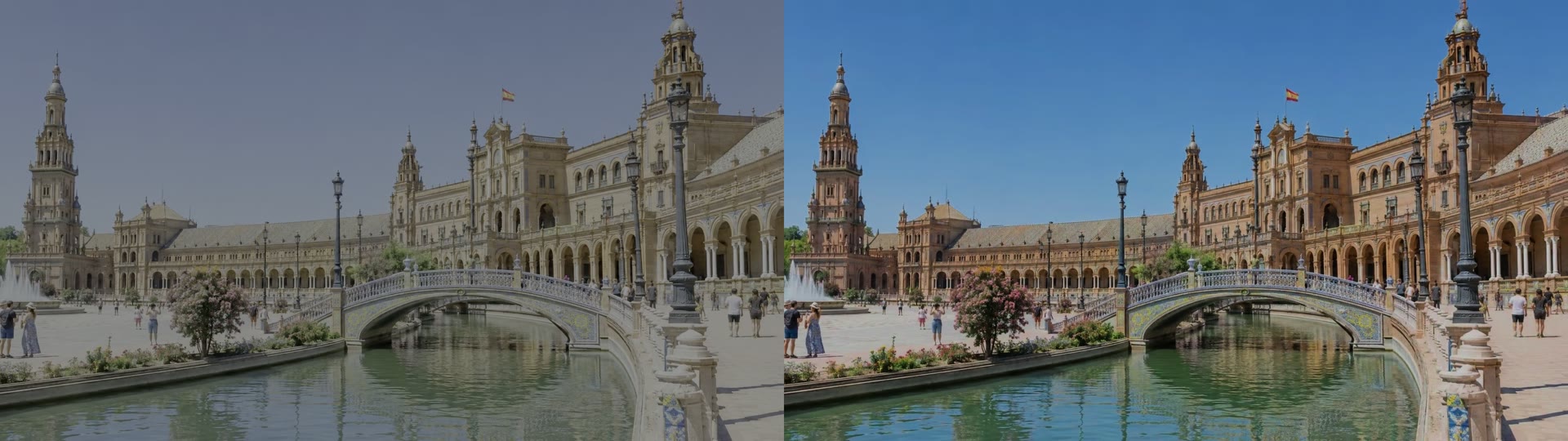
-pix_fmt yuv420p or format=yuv420p drops the extra bits and nothing else. The values are still PQ, and our output was still tagged smpte2084 and bt2020: an 8-bit HDR file, not an SDR one. Shown as SDR, it looks like the left half of the picture, flat and grey. Its average luma was close to the tone mapped file's, so the problem is the curve, not the brightness.
The ffmpeg documentation spells out what tonemap needs: floating point input in linear light, and another filter such as zscale around it. That is why the chain has six steps.
Hable or mobius
There's no single correct tone map. The documentation says hable preserves dark and bright detail at the cost of slightly darkening everything, while mobius keeps contrast and colors for in-range material. Measured as average luma, hable came out about 14% darker than the SDR original we built the HDR clip from, and mobius about 18% brighter.
Run both on a few seconds of your footage and keep the one that looks right. To cut a short test clip first, see how to trim a video with ffmpeg.
Size and codecs
The chain only changes the picture; pick the codec as usual. Our HDR10 input was HEVC Main 10. For an SDR HEVC copy, see H.265 with ffmpeg, and for the quality setting, the CRF guide.
Without installing ffmpeg
The same command as one API call
Send the same args to POST /v1/ffmpeg with the video's URL in inputs; zscale and tonemap are in the engine's build. Each job runs ffmpeg 8.1 on a fresh machine at $0.02 per compute minute, billed per second; this one finished in about 14 seconds and cost under half a cent.
curl "https://api.reelsdk.com/v1/ffmpeg?wait=60" \
  -H "Authorization: Bearer $REELSDK_KEY" \
  --json '{
    "inputs": {
      "hdr10-plaza.mp4": "https://api.reelsdk.com/f/lib/in/guides/hdr10-plaza.mp4"
    },
    "args": [
      "-i", "hdr10-plaza.mp4", "-vf",
      "zscale=t=linear:npl=100,format=gbrpf32le,zscale=p=bt709,tonemap=tonemap=hable:desat=0,zscale=t=bt709:m=bt709:r=tv,format=yuv420p",
      "-c:v", "libx264", "-crf", "20", "-c:a", "copy", "sdr.mp4"
    ],
    "outputs": ["sdr.mp4"]
  }'
FAQ
Questions, answered
How do I convert HDR to SDR with ffmpeg?
Decode to linear light with zscale, tone map, and convert back to BT.709: -vf "zscale=t=linear:npl=100,format=gbrpf32le,zscale=p=bt709,tonemap=tonemap=hable:desat=0,zscale=t=bt709:m=bt709:r=tv,format=yuv420p".
Why does my HDR video look washed out after converting?
The pixel values are still PQ but are being shown as SDR. A pixel-format change alone keeps the PQ curve: our test file stayed tagged smpte2084. Tone map it with zscale and tonemap instead.
Which tonemap algorithm should I use in ffmpeg?
hable keeps detail and darkens slightly; mobius keeps in-range colors and contrast. On our clip, hable came out darker and mobius brighter than the SDR original, so test both.
Can I convert HDR to SDR with an API?
Yes. The engine's ffmpeg build has zscale and tonemap; send the chain to POST https://api.reelsdk.com/v1/ffmpeg. It runs ffmpeg 8.1 on a fresh machine per job for $0.02 per compute minute, billed per second, and failed jobs are free.
- Encode H.265 (HEVC) with ffmpegEncode HEVC with libx265: CRF 28 against x264 CRF 23 on one clip, the hvc1 tag Apple players need, and 10-bit output.
- Choose a CRF value in ffmpegWhat CRF does in libx264, the file size and VMAF score for CRF 18, 23, 28 and 33 on one clip, and how x265's scale differs.
- Trim a video with ffmpegCut a clip with -ss and -to: frame-exact with a re-encode, fast with -c copy, and why the copy starts before your time.
- Compress a video with ffmpegShrink a video with ffmpeg: CRF 28 in x264 or x265, a smaller frame or a slower preset, with the size and quality each one gets you.
- Video conversionConvert WebM, MKV or MOV to MP4 and back in one ffmpeg call, about a third of a cent for a 30 s clip.
- FFmpeg onlineRun your own ffmpeg command on your files in the browser, free and without installing or uploading anything.
Ready to build?
Ship video from your app today
Your first $0.50 is free, and one key covers every endpoint.
